Log4J2 Updater Script for Wowza Streaming Engine
Wowza Media Systems is recommending that Wowza Streaming Engine users take immediate action to address the recent Apache Log4J vulnerabilities by using their Log4j2 Updater to get the latest Log4j2 files to fix security vulnerabilities with Apache Log4j2 versions earlier than 2.17.0 (CVE-2021-44228, CVE-2021-45046, CVE-2021-45105)
The updater uses the latest Apache Log4j version 2.17.0 files. Wowza has verified after running the updater that there are no current issues when scanning the server and that it meets the required mitigation action according to Apache
As a MEDIAL SaaS customer you are unaffected by this vulnerability
As a self hosted MEDIAL customer you are currently ONLY affected by this potential vulnerability if the version of Wowza Streaming Engine you are running is 4.8.8.01 or later
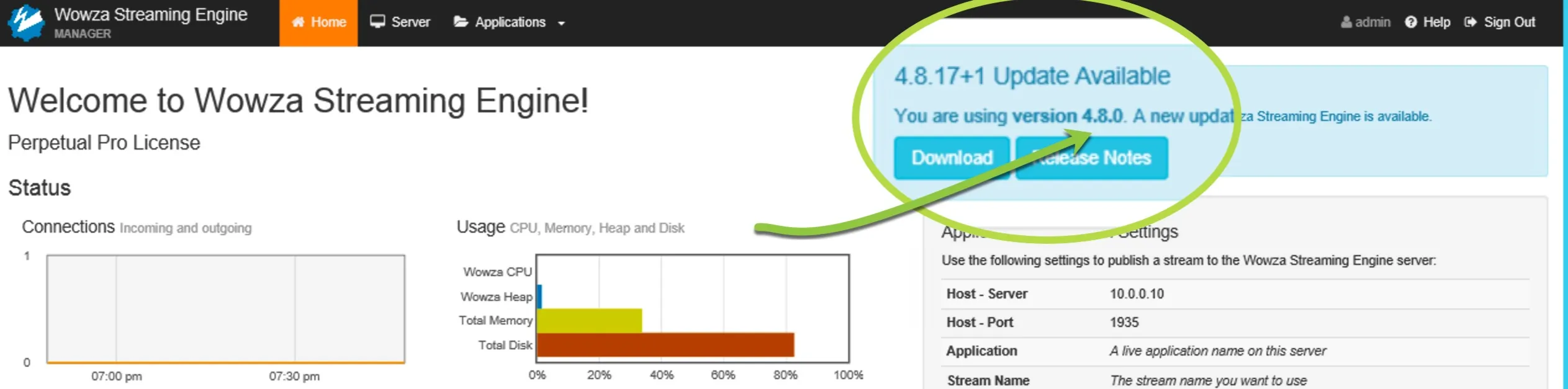
You can find out your Wowza Streaming Engine version by either navigating via a browser to the web address/hostname associated with it. The version number will be shown as below.

Alternatively you can open the Wowza Streaming Engine Admin page on your server where the version number will also be displayed in the UI as below
If your version is lower than 4.8.8.01 then no action is currently required
If your version is later than 4.8.8.01 then please follow the advice at Wowza's web page which is dedicated to this issue at:
https://www.wowza.com/docs/update-for-apache-log4j2-security-vulnerability
If you are unsure of the steps mentioned on this page and require assistance, log a support case by e-mailing support@medial.com
Please note this is a dynamic situation so please check back periodically at Wowza's help pages for any updates on this issue
The MEDIAL application itself does not use Java so is also unaffected by this issue. There are also no issues related to this vulnerability with any of our various integrations and plugins with third party systems