WEBINAR OVERVIEW | Closed Captioning Deadlines Are Here
Closed captioning is rapidly moving from a best practice to a legal requirement. With new accessibility laws taking effect across Europe and the United States, organizations that publish video content must treat captions and transcripts as core deliverables. At the same time, captioning no longer needs to be just a compliance cost. When done correctly, captions can become the foundation for powerful AI driven features that improve searchability, student engagement, and content discovery.
Table of Contents
Why captioning matters right now
Recent accessibility regulations put clear obligations on digital media publishers. The European Accessibility Act requires video content to be accessible, which in most cases means closed captions for new content published after its compliance date. Penalties are set at national level and can be meaningful.
In the United States, the Americans with Disabilities Act expects similar accessibility levels for video materials. Exact obligations depend on organization type and use, but accepted practice includes providing closed captions, readable transcripts, and synchronized text. Enforcement can come from federal agencies, civil rights complaints, or individuals.
Practical takeaway: caption all new video content and any content that remains in active use. That approach reduces legal risk and creates a predictable process for content teams.
What true compliance looks like
that reflect spoken content and important nonverbal audio cues when appropriate.
so text appears with the matching audio segment.
including appropriate font size, contrast, and line length when displayed.
so captions and transcripts are easy to find and download.
Captioning used to be expensive. That is changing
Historically the main barrier to broad caption adoption was cost. Human captioning and third party transcription services were reliable but expensive for large libraries. Newer approaches combine automated speech to text with optional human review to balance affordability and accuracy.
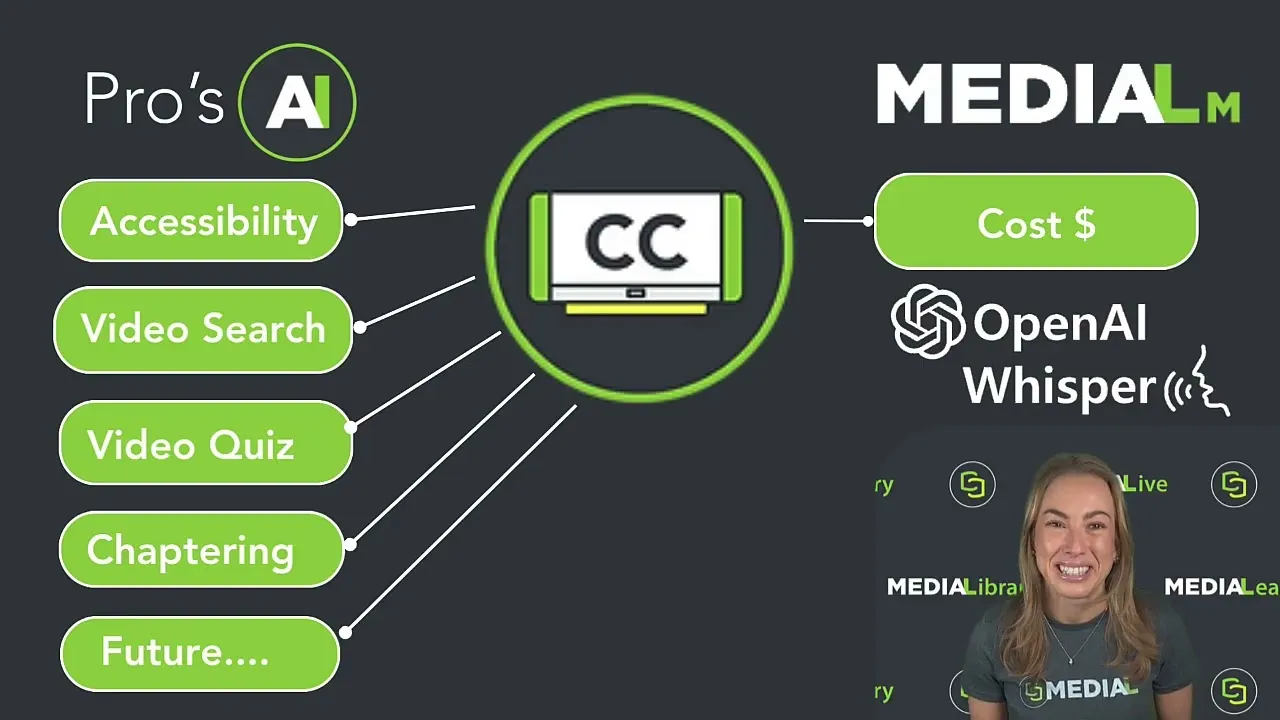
MEDIAL version 9 introduces an AI speech to text model that runs within the platform. This reduces per-video costs while unlocking a group of AI driven features that depend on high quality text aligned to video. If higher accuracy is required, human captioning remains available as an option.
What you unlock when captions exist
Once you have reliable captions, you gain more than compliance. Captions provide high quality, searchable text that powers:
: jump directly to the second where a keyword is spoken.
: AI generates chapter titles and timestamps so learners can skip to relevant sections.
: create formative assessments from the video transcript and insert questions along the timeline.
: searchable text improves indexing and content recommendations.
How to enable closed captions in MEDIAL
MEDIAL centralizes caption management so teams can automate the heavy lifting and control which users get access to captioning features. The workflow is simple:
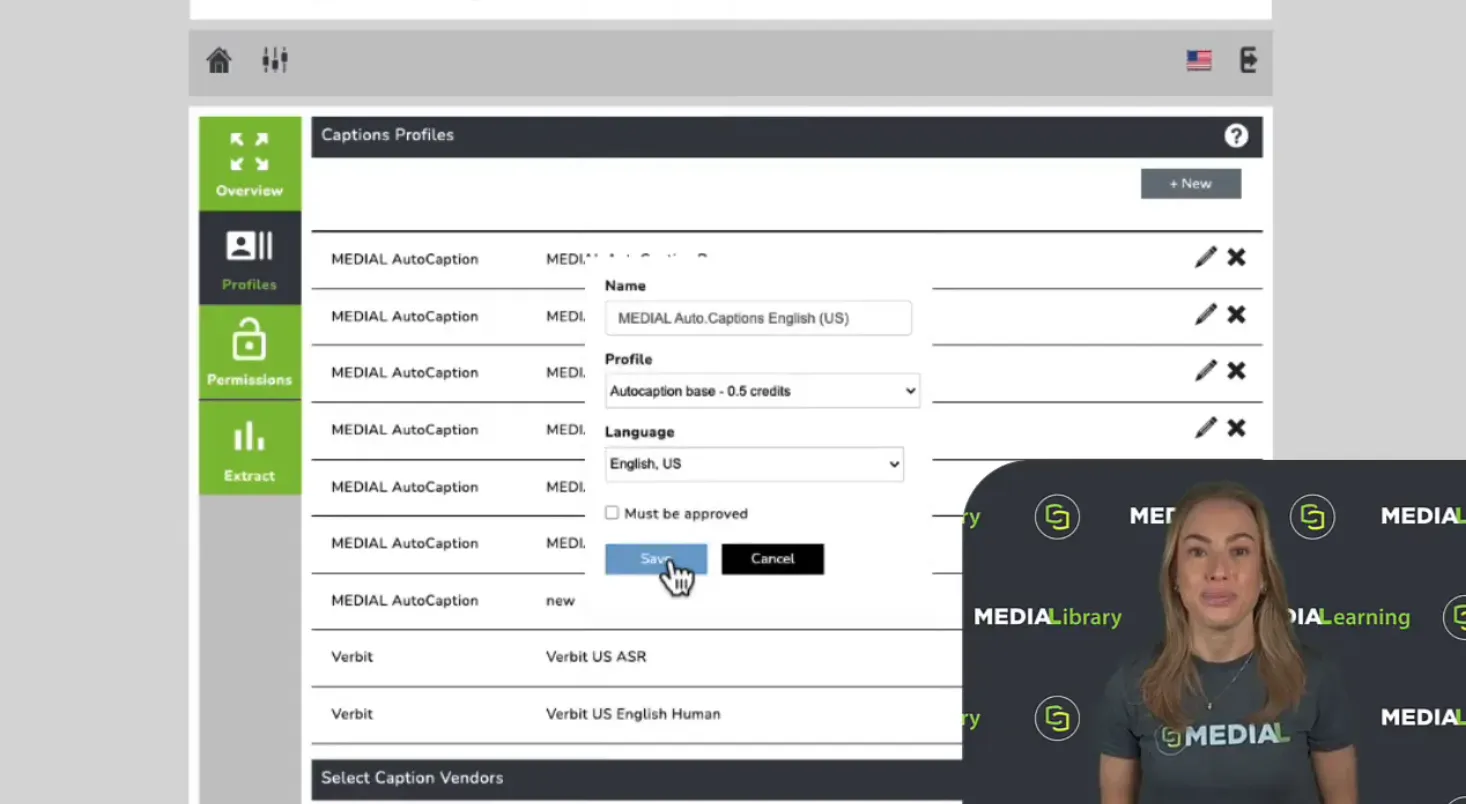
Log in to your MEDIAL admin dashboard and open the closed captions area.
Create a new captions profile and select the language. This profile is the template that controls how captions are generated and which model is used.
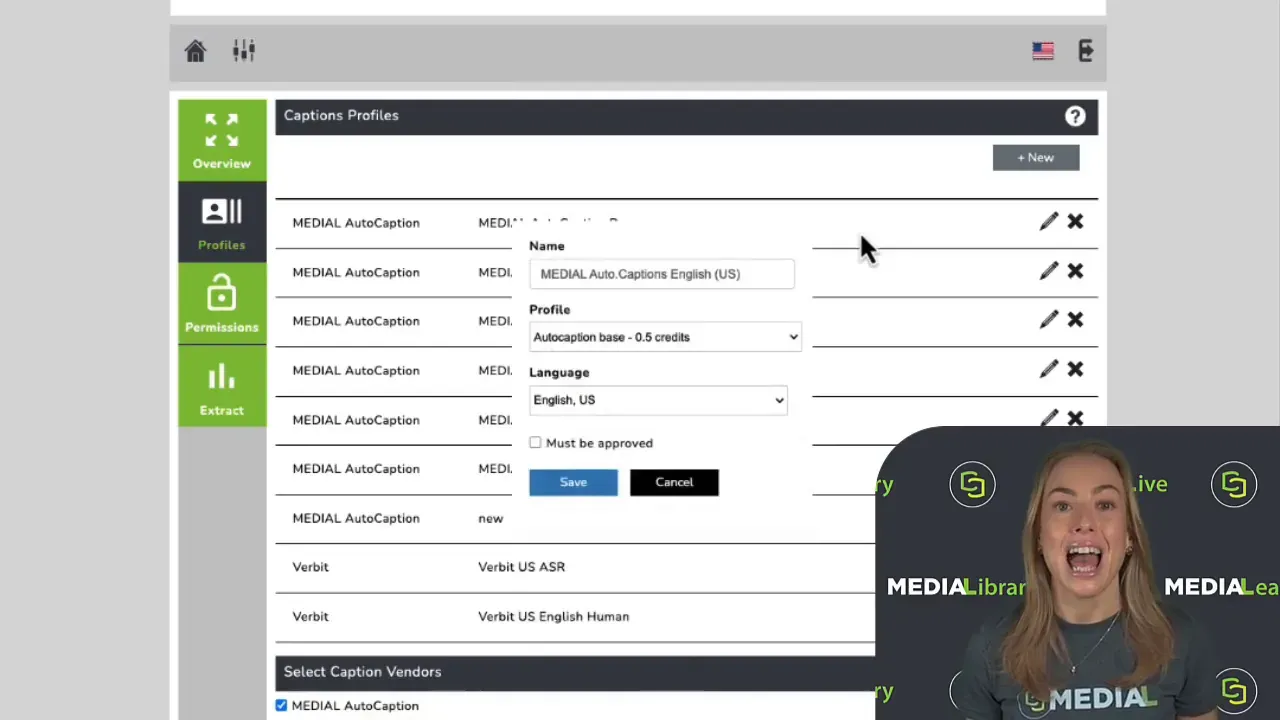
After creating the profile, set permissions. There are three common modes:
: selected users can request captions manually for their uploads.
: chosen groups or users have every upload captioned automatically.
: certain users can request captions and also act as approvers so admins retain control over quality before publication.
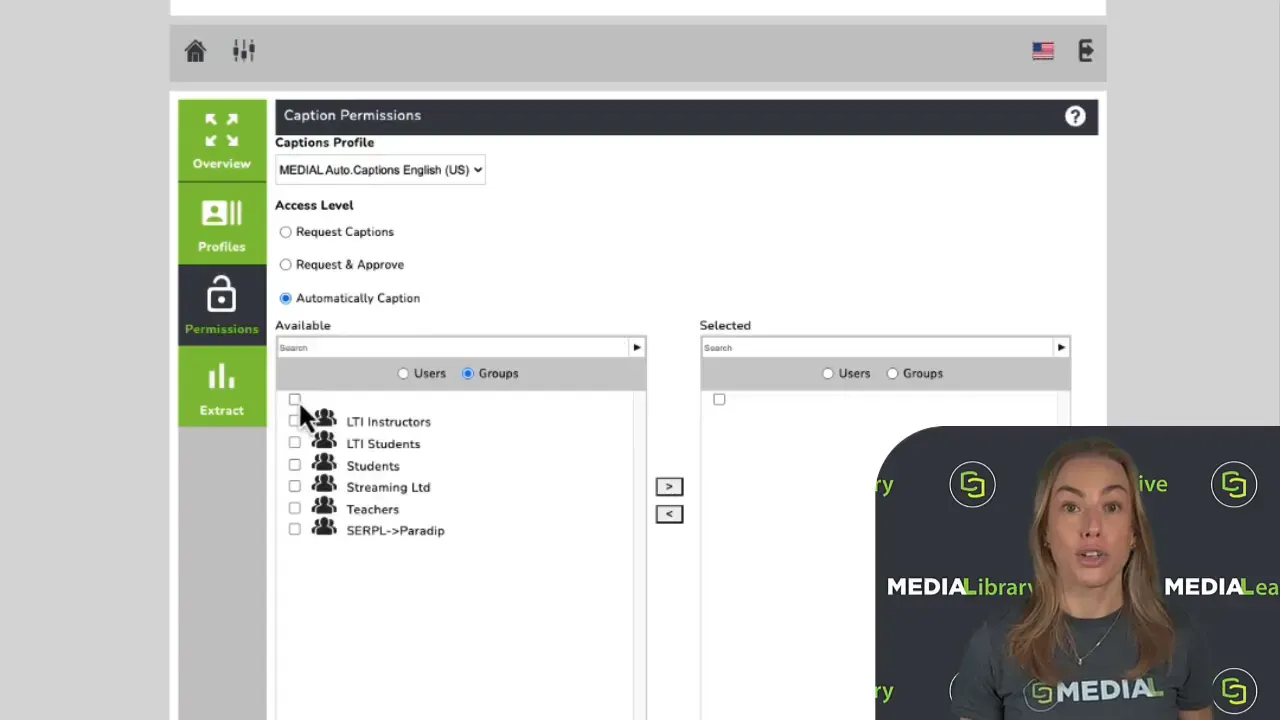
The approval workflow keeps administrators in control. A user uploads a video, selects a captions profile and requests captions. Approvers see requests in the admin area and can approve, replace, or edit captions before they go live.
AI driven learning features: an example with quizzes
Captions are the engine behind automatically generated quizzes. MEDIAL integrates with LMS platforms such as Moodle to build quizzes directly from a video transcript. Typical setup steps include selecting the media item, choosing quiz options, and using an AI button to generate questions.
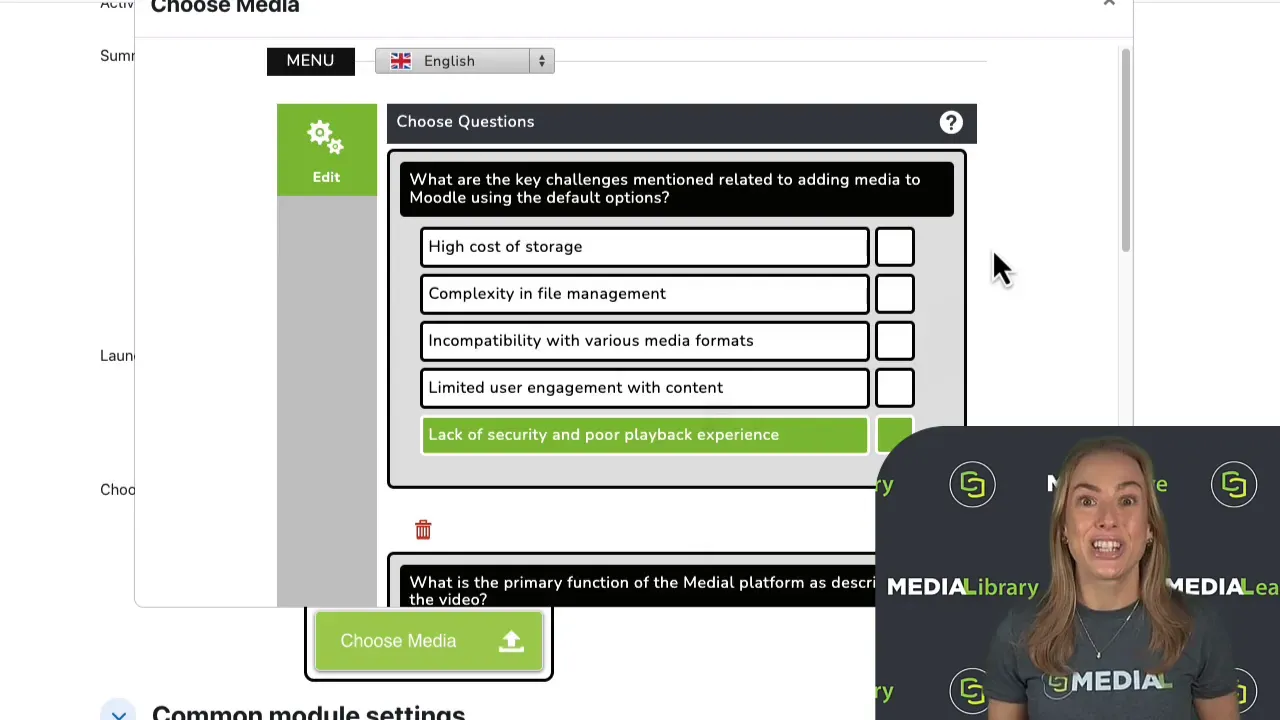
The AI will generate question types such as multiple choice and true or false. Questions appear on the video timeline as annotations and can be edited or replaced. When learners complete the questions, scores sync back to the LMS gradebook.
In video search and automatic chaptering
In video search lets users find the exact moment a word or phrase is spoken. Results list each occurrence with a timestamp; clicking a result seeks the video to that point. This capability is a massive time saver when dealing with long lectures or recorded meetings.
Automatic chaptering uses caption text to identify segment boundaries and generate descriptive titles. Chapters make long videos skimmable and improve comprehension for learners who want to focus on specific topics.
Operational recommendations
and schedule retroactive captioning for actively used legacy content.
in MEDIAL to apply consistent caption profiles and AI features across your library.
. Use MEDIAL auto captions for scale and human captioning for high stakes materials.
so course owners can request captions and approvers can validate quality before publishing.
Benefits beyond compliance
Captioning reduces legal and reputational risk. It also increases the value of every video by making content discoverable and interactive. When captions are part of a platform workflow, compliance becomes an investment that enhances learning outcomes and content reuse.
Getting started with MEDIAL
MEDIAL provides a fast route to compliance and new AI features. A practical launch plan looks like:
Identify priority content: new courses and actively used recordings.
Create caption profiles and set automated rules for user groups.
Run auto captions at scale then sample for quality and adjust profiles where needed.
Enable AI features such as in video search, chaptering, and quizzes once captions are available.
MEDIAL also offers a promotional allocation of free captioning hours to help teams get started quickly. This is useful to pilot workflows and demonstrate immediate value.
FAQ
Which videos must be captioned to meet legal obligations?
Caption new content published after applicable compliance dates and any older content that remains in active use. When in doubt, prioritize material used in courses or public-facing sites.
How accurate do captions need to be?
Accuracy should be sufficient to convey spoken content and context. Automated captions often meet baseline requirements but may require human review for specialized vocabulary, legal or medical lectures, and high stakes assessments.
Can MEDIAL auto captions satisfy legal requirements?
MEDIAL auto captions offer affordable, synchronized text that satisfies many accessibility needs. For strict legal or compliance scenarios, pair auto captions with human review where necessary.
What is the easiest way to start?
Start by enabling automatic captioning for new uploads and captioning legacy content used in active courses. Use MEDIAL permissions to control who can request or approve captions.
Does captioning add additional value besides compliance?
Yes. Captions unlock in video search, automatic chaptering, AI generated quizzes, and improved content discovery. These features reduce friction for learners and increase the utility of video assets.
Final thoughts
Closed captions are no longer optional. With regulations tightening and enforcement more active, organizations must embed captioning into their video workflows. The good news is captioning can now be affordable and strategic. By centralizing video in MEDIAL and using captions as a foundation, compliance becomes a way to boost engagement, accessibility, and the overall value of your media library.
If you are evaluating next steps, consider piloting automatic captioning on a representative set of content and enabling one AI feature such as in video search or chaptering to demonstrate tangible benefits quickly.