Secure Video Streaming: A UK Guide for Education & Training
A lot of teams realise they need secure video streaming only after a near miss. A board presentation gets forwarded outside the company. A recorded student assessment sits in the wrong folder. A training video embedded in the LMS turns out to be reachable from a copied public link. None of these failures look dramatic when they start. They look like ordinary admin shortcuts.
In UK education and training settings, video security isn't only a technical topic and it isn't only about piracy. It sits at the point where platform design, access control, safeguarding, and data protection all meet. If your videos include staff briefings, student submissions, compliance training, classroom recordings, or internal know-how, you're not just protecting media files. You're protecting identity, context, and trust.
Defining Your Secure Streaming Strategy
A leaked Q4 strategy presentation doesn't just expose confidential plans. It tells staff and stakeholders that the organisation hasn't controlled access to one of its most sensitive communication channels. The same applies in education. If an assessment recording or pastoral support video becomes accessible to the wrong audience, the issue is bigger than a broken player link.
That is why secure video streaming should be treated as an operational requirement, not a feature list. In the UK, the conditions for large-scale protected delivery are already in place. Ofcom reported that 94% of UK homes had access to superfast broadband in 2024, 83% had full-fibre availability, and 88% of UK adults were internet users in 2023, which is one reason secure delivery and access control have become standard expectations rather than specialist add-ons (Ofcom figures referenced here).
Start with the real business risk
Often, organizations begin by asking which platform supports encryption, DRM, or SSO. That's too late. First decide what you're protecting and why. For a university, that may include lecture capture, student presentations, viva recordings, and staff development content. For an L&D team, it may be product training, leadership briefings, audit evidence, or regulated procedure walkthroughs.
A useful starting point is to identify four stakeholders:
IT and security teams who care about authentication, logging, storage permissions, and incident response
L&D or academic teams who need access to stay simple for legitimate learners
Compliance and data protection leads who need defensible handling of personal data
Content owners who decide what material is confidential, licensed, assessed, or shareable
If those groups don't agree on risk levels, the technical design usually becomes inconsistent. One department demands open sharing, another expects strict control, and the video platform gets blamed for conflicting policy.
Practical rule: classify the content before you configure the platform. Security controls work better when they follow the content's sensitivity, not when they are applied as a blanket default.
Define the principles before the tooling
A sound strategy usually rests on a short set of principles:
Default to private access for anything containing personal, assessed, or commercially sensitive information.
Authenticate users through systems you already trust, such as your LMS, identity provider, or corporate directory.
Grant the minimum access needed for the task. A student enrolled on one module shouldn't be able to browse unrelated recordings.
Log access and administrative actions so you can investigate problems later.
Plan layered defence rather than relying on one control.
For teams that need a broader framework around layered protection, this guide to actionable steps for cyber threats is useful because it frames security as a sequence of controls rather than a single product decision.
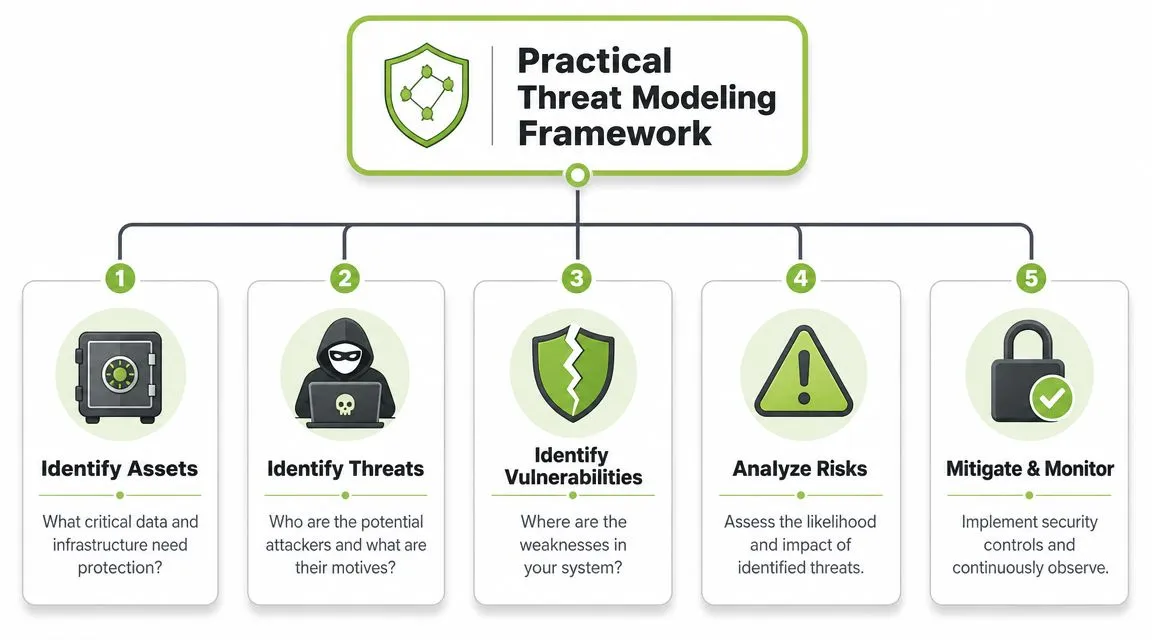
Building a Practical Threat Model
Most video security discussions drift straight to external attackers. In practice, many of the failures I see are much less dramatic. Shared logins. Old permissions that were never removed. Publicly reachable media storage. An LMS course copy that retained links to the wrong media library.
Secure video streaming in UK institutions also needs a wider definition of risk. It isn't only about stopping copying. It also has to account for safeguarding assessment videos, student recordings, and corporate training data inside LMS workflows and other integrations. That matters because organisations need to preserve access for legitimate users while limiting exposure of personal data.
Three threat categories worth separating
A practical threat model becomes clearer when you split risks into categories instead of using the catch-all term "breach".
Unauthorised but valid user access
This is the most common category in education and workplace learning. The user is real. Their access is the problem.
Examples include:
A student shares a course link with someone outside the cohort
A former employee keeps access after moving teams or leaving
A departmental admin inherits broad rights and can view recordings they shouldn't handle
A trainer downloads a file locally and stores it outside approved systems
These failures usually point to weak authorisation, not weak encryption.
Exposure through misconfiguration
This category is technical, but it usually starts with ordinary setup mistakes. Media storage, CDN rules, embedded players, or cached links can all expose content if defaults are left too open.
Warning signs often include:
Static playback links that never expire
Anonymous read access on storage
Over-permissive embed settings
Testing folders left connected to production content
Deliberate extraction or redistribution
Piracy discussions are relevant in this domain, yet the specific context remains important. A commercial training provider may worry about paid content being reposted. A university may be more concerned about sensitive recordings being captured and shared privately rather than sold.
Threat modelling works better when you ask, "Who could misuse this exact content, and how would they realistically get it?" instead of "How do we stop all attackers?"
Score impact before buying controls
Not every video needs DRM. Not every recording belongs behind multiple checkpoints. A sensible model weighs impact against likelihood.
| Content type | Likely risk | Main concern | Strong first control |
|---|---|---|---|
| Lecture recordings | Link sharing | Unintended access | LMS-based authorisation |
| Student assessments | Privacy exposure | Personal data and safeguarding | Restricted roles and audit logs |
| Internal training | Former staff access | Policy and HR risk | Identity-linked access with deprovisioning |
| Commercial courses | Redistribution | Revenue and IP protection | Token controls, possible DRM |
Build your threat model around assets
Start with assets, not controls. List the videos, metadata, user identities, storage locations, logs, and integrations involved. Then ask:
What would cause harm if exposed
Who has access today
How is that access granted and revoked
Where could someone bypass the intended route
What evidence would you have after an incident
That last question matters more than is often appreciated. If you can't tell who accessed what, from where, and under which entitlement, you'll struggle to separate a user error from a genuine compromise.
Encrypting Content at Rest and in Transit
Encryption gets discussed as if it's one decision. It isn't. For video, there are two different protections doing two different jobs.
Encryption in transit protects the connection while the viewer requests and receives the stream. Encryption at rest protects the stored video files and related assets when they sit in storage, archives, or backups. If you only implement one, you leave a predictable gap.
In transit protects the journey
Think about a university lecture archive accessed from campus, home, and mobile networks. When a student signs in and presses play, the control requests and media delivery need protection while moving across the network. That is where HTTPS and TLS matter.
If this layer is missing or poorly implemented, a user may still see a login page and a branded player, but the underlying exchange is less trustworthy. You're protecting neither the session nor the media path properly.
Check these basics with your provider or internal team:
Playback pages use HTTPS throughout
API calls and player requests also use protected transport
There are no mixed-content warnings caused by insecure embedded assets
Certificates are managed and renewed properly
At rest protects the library
Now look at the same archive from the storage side. If someone gains improper access to the underlying storage, or if files are copied into an uncontrolled environment, encryption at rest reduces the damage. It doesn't replace access control, but it limits exposure from storage compromise and operational mistakes.
This matters in real life because video libraries tend to grow untidily. Teams duplicate files, create exports, move recordings between systems, and retain content longer than they intended. Every extra copy becomes another storage risk.
A secure player doesn't guarantee secure storage. Many leaks start behind the player, not through it.
Why both layers belong together
If you protect only transit, the stored library may still be vulnerable to internal error or infrastructure compromise. If you protect only storage, the session and delivery path remain exposed during playback.
A simple way to review your setup is to ask for evidence of both:
How is traffic protected when users authenticate and stream?
How are media files protected in primary storage, backups, and archives?
Who can access decrypted files operationally?
What happens when content is exported or transcoded?
In education and training environments, this is especially important for recordings that persist beyond their first use. The board briefing, the assessment submission, and the annual compliance module all tend to stay in the system longer than anyone planned. Encryption at rest helps when retention discipline isn't perfect. Encryption in transit helps every time the content is played.
Implementing Robust Access Control Mechanisms
Access control is where secure video streaming stops being theoretical. Encryption protects content from being read casually. Access control decides who is allowed to get near it in the first place.
The practical choice usually comes down to three models: signed URLs or tokens, DRM, and identity-driven platform access through SSO or directory integration. They solve different problems. Teams often overbuy one and underuse another.
A sensible architecture often starts with request validation at the edge.
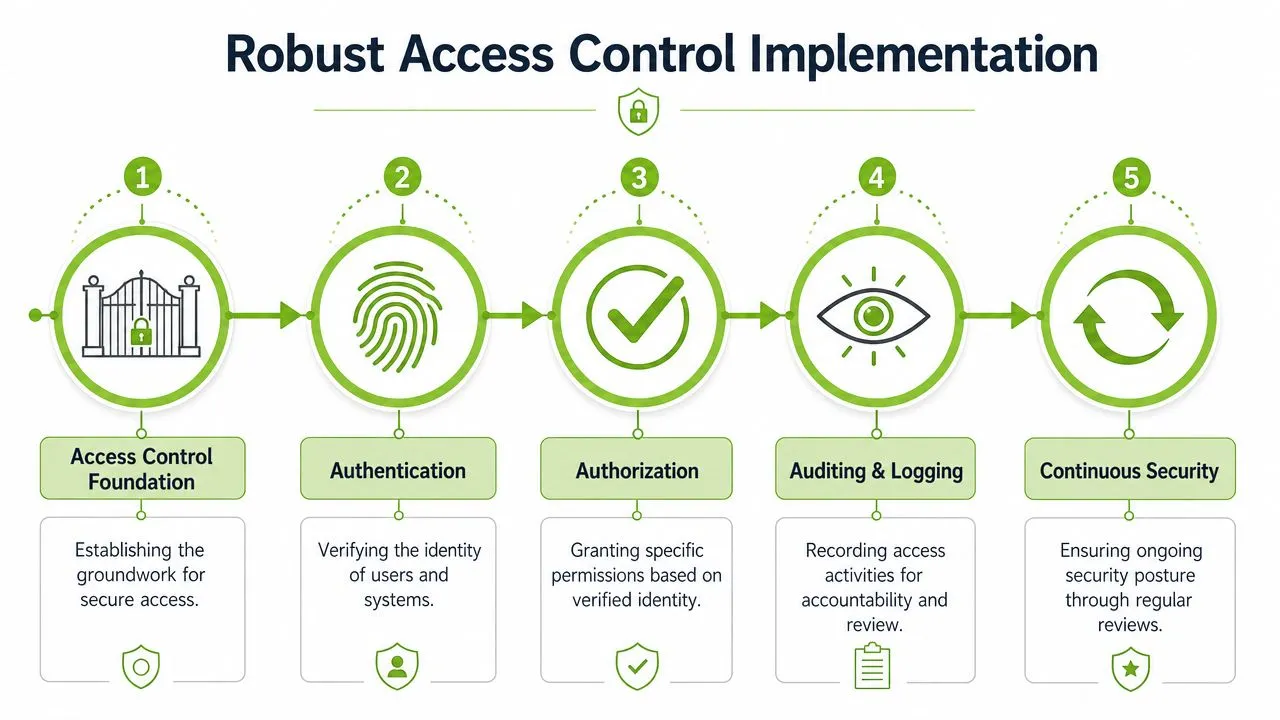
Signed tokens for controlled playback
For most internal education and training workflows, short-lived signed tokens are the workhorse control. A UK-relevant pattern is to combine HTTPS or TLS for control paths, short-lived signed tokens for playback authorisation, and CDN edge checks that validate each request. Guidance also recommends binding tokens to a user session, IP, or device, and using geo or IP restrictions to reduce hotlinking and token sharing (practical workflow reference).
This is the right fit when:
Learners access video inside an LMS or staff portal
You need links to expire quickly
You want to reduce hotlinking and casual sharing
The content is important but not cinema-grade premium media
A student opening a lecture from Moodle or an employee watching a policy update in the HR portal usually fits this pattern well. The user authenticates through the front-end system, receives a temporary entitlement, and the CDN checks whether that request is still valid.
What doesn't work well is relying on static media URLs. If a manifest or playback link can be copied and reused without revalidation, sharing becomes easy.
DRM for higher-value or higher-risk content
Digital rights management adds another layer. It is usually better suited to paid courses, licensed content, or material where stronger playback restrictions are justified. DRM won't solve every leak. It also brings more complexity, more compatibility decisions, and more user support overhead.
Use DRM when the content has one or more of these traits:
It generates direct revenue
It carries licensing obligations
Offline use needs strict control
You need tighter restrictions on playback environments
For a commercial training company selling premium certification content, DRM may be proportionate. For internal staff briefings, it often isn't. In those cases, strong authorisation, logging, and sensible retention do more good than a heavier media rights stack.
Before committing, test the user experience on managed laptops, personal devices, and common browsers. The strongest control on paper can become a support burden if legitimate users can't play the content smoothly.
A broader view of physical and digital entry points can also help frame these decisions. Teams reviewing site-wide permissions may find ideas in Home AV Pros commercial security, especially when video access forms part of a larger access governance conversation.
Identity-based access through SSO
If your users already sign in through Microsoft Entra ID, AD, LDAP, or another identity provider, don't create a parallel access system unless you have to. A single identity source simplifies provisioning and, just as important, deprovisioning.
For LMS and training environments, using single sign-on with MEDIAL is one example of how video access can be tied back to institutional authentication rather than managed separately.
This walkthrough gives a useful visual summary of access control layers before you finalise your design.

Which option fits which scenario
| Scenario | Best-fit control | Why |
|---|---|---|
| Internal staff training | SSO plus short-lived tokens | Low friction, central account management |
| LMS lecture delivery | LMS authorisation plus signed playback requests | Good balance of access and usability |
| Student assessment recordings | Role-based access, audit logs, limited retention | Privacy matters more than anti-copy tooling |
| Paid external courses | DRM plus token controls | Better suited to IP and redistribution risk |
Choose the least restrictive control that still matches the content risk. Overcomplicated access models usually fail at enrolment, support, or adoption.
Choosing Between On-Premises and Cloud Deployment
Deployment choice shapes your security model long before a user presses play. The on-premises versus cloud decision isn't really about where the files sit. It's about who carries operational responsibility for patching, scaling, monitoring, and proving control.
Some institutions prefer on-premises because they want direct oversight of infrastructure, storage, and integration paths. Others choose cloud platforms because maintaining secure media delivery internally is a significant workload. Both positions are reasonable. The wrong choice is assuming one model is automatically safer.
What on-premises gives you
On-premises deployments give you tighter control over architecture and change management. If you have strict internal policies, complex network segmentation, or unusual integration requirements, that control can be useful.
But control also means ownership of the hard parts:
Patching servers and supporting components
Maintaining storage security
Managing resilience and failover
Scaling live and on-demand delivery
Monitoring logs, alerts, and abnormal behaviour
This model tends to work best when the organisation already has mature IT operations and a clear reason to keep the stack close.
What cloud changes
A cloud or SaaS platform shifts much of the infrastructure burden to the provider. That can improve consistency, especially for teams that don't want to build secure media delivery from scratch. It also changes your due diligence. Instead of asking, "Can we run this securely?" you ask, "Can this provider prove they run it securely, and can we configure it properly?"
For education teams comparing hosted approaches, this overview of cloud streaming video for modern education is a useful reference point when discussing operational trade-offs internally.
On-Premises vs. Cloud Security Trade-Offs
| Consideration | On-Premises | Cloud (SaaS) | Best For |
|---|---|---|---|
| Infrastructure control | High direct control over servers, storage, and network paths | Lower direct control, configuration sits within provider boundaries | On-prem for bespoke security architectures |
| Operational burden | Internal team manages updates, resilience, and monitoring | Provider handles much of the underlying platform maintenance | Cloud for lean IT teams |
| Scalability | Requires capacity planning and internal engineering | Usually easier to scale for live events and growing libraries | Cloud for variable demand |
| Compliance evidence | Evidence comes from your own processes and systems | Shared responsibility model, provider evidence matters | Depends on governance maturity |
| Custom integration | Often more flexible for unusual internal systems | Usually good, but bounded by vendor capabilities | On-prem for highly customised estates |
| Cost profile | Higher internal effort and potentially larger upfront investment | More predictable service-based spending, but recurring | Depends on long-term usage and staffing |
The decision criteria that matter most
A practical decision often comes down to these questions:
Do you have internal capability to secure and maintain the stack properly?
Is your content sensitivity driving a genuine infrastructure requirement, or just a preference?
How often do your access patterns spike, especially for live events or enrolment peaks?
Do you need deep integration with internal identity, archive, or recording systems?
If you answer "yes" to control and customisation, on-premises may be justified. If you answer "yes" to speed, scale, and reduced maintenance, cloud is often the better fit. Hybrid models can work too, but only when teams are clear about which system owns identity, storage, and audit history. Otherwise hybrid duplicates complexity.
Integrating with Your LMS and Ensuring Compliance
Most institutions don't want users logging into one system for coursework and another for video. More important, they shouldn't have to. A secure integration pattern keeps the LMS or learning portal as the place where identity, enrolment, and entitlement are already understood.
That is where LTI, SSO, and directory-aware video platforms earn their value. They reduce duplicated user management and lower the chance of permissions drifting away from real course membership or employee assignment.
Keep the LMS as the source of truth
If Moodle, Canvas, Blackboard, D2L, or a corporate learning portal already knows who belongs in a module or training group, use that fact. The cleaner pattern is:
Authenticate in the LMS
Pass authorised context to the video layer
Restrict playback based on course, role, or assignment
Log access events in a way administrators can review
This doesn't eliminate security work. It makes it more coherent. You avoid creating separate usernames, separate access lists, and separate administrative workflows that fall out of sync.
One practical compliance angle often gets missed here. The UK GDPR and the Data Protection Act 2018 establish rules for processing personal data, and the Information Commissioner's Office treats video data, identity controls, and access logs as security-relevant. In other words, secure video streaming in the UK is not just about piracy. It is also about lawful handling of viewer data and authenticated access (UK compliance context here).
Compliance is built from ordinary technical choices
Teams sometimes look for a single "GDPR-compliant video platform" decision. That isn't how this works. Compliance usually comes from a sequence of ordinary architecture choices made well.
Those choices include:
Minimising duplicate user data between systems
Restricting access to enrolled students or assigned staff
Capturing meaningful access logs
Applying retention rules to recordings
Separating admin rights from viewing rights
If your video workflow sits inside the LMS, those controls become easier to govern because course membership and role data already exist. If the video platform sits beside the LMS without robust integration, administrators often end up maintaining permissions twice.
The safest integration is usually the one with the fewest manual handoffs. Every spreadsheet import and one-off access exception creates a new compliance risk.
Article 32 thinking for video workflows
Article 32 discussions often focus on abstract "security of processing". Video makes that requirement concrete. A recording may contain a face, a voice, a name, an assessment, or a sensitive staff discussion. That means your controls around playback, logging, storage, and deletion are part of the compliance story, not separate from it.
This guide to Article 32 GDPR for your LMS is worth sharing with both IT and learning teams because it helps connect legal language to day-to-day platform decisions.
For educational and corporate use cases alike, the strongest pattern is usually boring by design. Users sign in once. Access follows real membership. Logs exist. Exports are limited. Recordings do not remain visible forever. That won't feel as dramatic as a DRM discussion, but it is where most real-world risk gets reduced.
Your Final Pre-Launch Monitoring and Testing Checklist
A secure design on paper can still fail in production. The handover from project mode to live operation is where weak assumptions get exposed. Someone copied a role from the wrong course. A token expiry breaks mobile playback. A former employee account still resolves through SSO. These are not edge cases. They are launch-week problems.
Before go-live, test the workflow as if you don't trust your own configuration. Then keep monitoring as if a good launch proves nothing permanent.
What to verify before launch
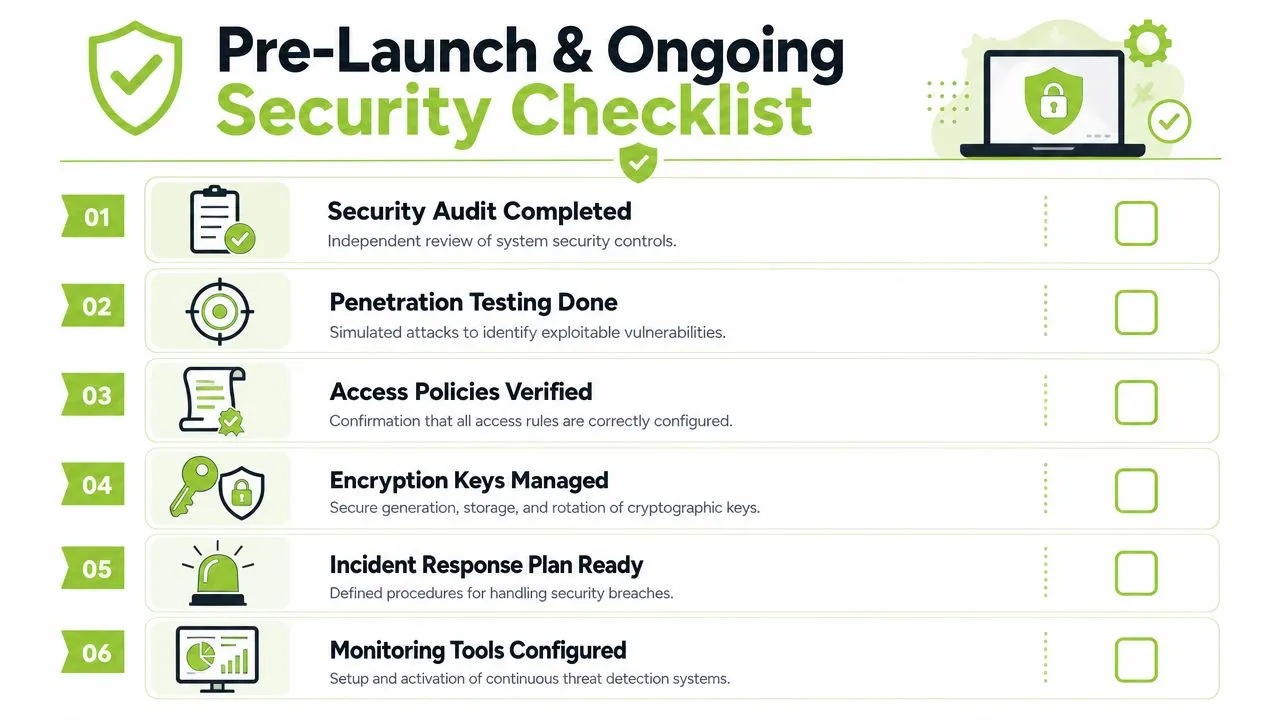
Create test users that reflect reality, not ideal scenarios. Use at least one student or learner account, one instructor or trainer account, one departmental admin, and one user who should have no access at all.
Run checks such as:
Role separation: confirm a user in Course A cannot see videos from Course B
Entitlement expiry: remove a user from a cohort and verify access is revoked quickly
Player behaviour: test embedded playback, direct links, mobile access, and off-site access
Storage exposure: confirm underlying media files aren't reachable through public paths
Logging quality: verify that access events are usable during investigation
What to monitor after launch
Once the service is live, focus on patterns that reveal misuse or configuration drift. In secure video streaming environments, these are often more useful than generic uptime metrics.
Watch for:
Failed login spikes that may indicate credential attacks or SSO issues
Unusual viewing behaviour such as repeated access from unexpected locations or devices
Repeated 403 or 404 responses around media requests, which can indicate scraping or broken authorisation
Sudden cache anomalies or delivery errors that may point to token misuse or restreaming attempts
Unexpected admin changes to permissions, libraries, or embed settings
Launch is the start of evidence gathering, not the end of the project.
A practical operating checklist
Use this checklist before and after launch:
Audit storage permissions first. If media storage is exposed, later controls won't save you.
Validate authentication paths. Every playback request should trace back to a trusted identity or authorised session.
Test deprovisioning. Remove access and confirm it disappears.
Review retention settings. Old recordings often become your weakest asset.
Check incident response ownership. Know who investigates access complaints, leaks, or suspicious logs.
Schedule periodic access reviews. Course copies, staff turnover, and platform changes create quiet permission creep.
The teams that handle secure video streaming well don't treat it as a one-off implementation. They treat it like any other business-critical system. It gets reviewed, tested, and tightened over time.
If you're reviewing secure video streaming options for education or workplace learning, MEDIAL is one platform to consider. It supports LMS-integrated video workflows, live and on-demand delivery, and both cloud and on-premises deployment models, which makes it relevant for teams balancing access, compliance, and operational control.